This blog has been quiet lately despite all the things I have to share. The main culprit is Twitter. Everything there is to share, trickles away 140 characters a time and nothing is left for a long blog post.
Well, here is an update. I spent the last month applying all the ideas from the inkface library to the Android platform. During the exercise I have written an Android App - a Twitter client - Cutewit. Few hours ago I uploaded a preview version of the app, to Android market and SlideMe. Here are some screenshots:
All the GUI was developed in Inkscape as SVG images. The app lacks many features, but they will soon be coming in the 1.0 release.
If you have Android phone, give it a shot. Even if you don't have a phone (not unlike me) you can still try it in Android emulator that's part of the SDK. I myself plan to use it as a desktop app, running in the emulator window.
That's all for now... follow me on twitter (@jyro) if you are interested in updates.
Showing posts with label inkface. Show all posts
Showing posts with label inkface. Show all posts
Tuesday, May 19, 2009

Friday, April 17, 2009
Preprocessing the GUI
Couple of days ago while on a bus, an old idea resurfaced in my mind. I had briefly thought about it in the past and then shelved it in some corner. But now the idea seemed very relevant.
The way inkface works is, when the application starts it invokes inkface to load an SVG document. Inkface library will parse the XML and render individual elements and return them to the application. The GUI loaded like this has rich look, but the loading time is high (especially on handheld devices). This is because loading of elements involves parsing of XML and then rendering it. This is resource consuming as well as time consuming stage. What if this is done during the GUI design time and not at the runtime. (Similar to compiling the source code as opposed to interpreting it at runtime).
In past couple days, I implemented this idea in the form of an Inkscape plugin. With this plugin, the designer of the GUI has to save the SVG GUI in a file of different extension (.ink). Inkscape automatically triggers the plugin code upon this. The plugin then parses the SVG and renders its elements into raster images and saves them as PNG images. These PNG images are put into a ZIP archive along with some metadata and that ZIP archive is stored as the .ink file.

Now at the runtime, instead of the SVG file, the application will pass the inkface library a .ink file. The inkface library opens the Zip archive and loads the pixbuffers from PNG images to return them as Element objects to the application. This way it doesn't spend time and resources in parsing and rendering of the SVG shapes.
When I ran the modified code using this strategy with pygame backend, I got positive results as expected. I found that loading a .ink file takes at least half as long as the .svg file. That's 100% improvement. I ran the test on Openmoko Freerunner.
This approach not only improves the performance, but also eases porting on new backends. For instance, Qt can't directly work with cairo. But if rendering is not done at runtime, the rendering stage is completely bypassed. It is trivial to load PNG images onto Qt widgets.
Of course there is little downside to this approach. The elements loaded from PNG images, cannot be manipulated as vector graphics at runtime. In other words, one cannot resize them or change their SVG properties and re-render them to their new look. It is not yet clear, how much this feature is useful in real life anyway, so I don't think this is a big trouble. Furthermore, a hybrid approach can be implemented if it turns out to be so desirable feature.
The plugin contains just two files (inkplug.inx and inkplug.py) which you can drop in /usr/share/inkscape/extensions/ and restart Inkscape. inkplug.py will need inkface library however, so make sure it is installed on your system. (inkface v0.2.5+). In future I will look into making this plugin installation easier.
The way inkface works is, when the application starts it invokes inkface to load an SVG document. Inkface library will parse the XML and render individual elements and return them to the application. The GUI loaded like this has rich look, but the loading time is high (especially on handheld devices). This is because loading of elements involves parsing of XML and then rendering it. This is resource consuming as well as time consuming stage. What if this is done during the GUI design time and not at the runtime. (Similar to compiling the source code as opposed to interpreting it at runtime).
In past couple days, I implemented this idea in the form of an Inkscape plugin. With this plugin, the designer of the GUI has to save the SVG GUI in a file of different extension (.ink). Inkscape automatically triggers the plugin code upon this. The plugin then parses the SVG and renders its elements into raster images and saves them as PNG images. These PNG images are put into a ZIP archive along with some metadata and that ZIP archive is stored as the .ink file.

Now at the runtime, instead of the SVG file, the application will pass the inkface library a .ink file. The inkface library opens the Zip archive and loads the pixbuffers from PNG images to return them as Element objects to the application. This way it doesn't spend time and resources in parsing and rendering of the SVG shapes.
When I ran the modified code using this strategy with pygame backend, I got positive results as expected. I found that loading a .ink file takes at least half as long as the .svg file. That's 100% improvement. I ran the test on Openmoko Freerunner.
This approach not only improves the performance, but also eases porting on new backends. For instance, Qt can't directly work with cairo. But if rendering is not done at runtime, the rendering stage is completely bypassed. It is trivial to load PNG images onto Qt widgets.
Of course there is little downside to this approach. The elements loaded from PNG images, cannot be manipulated as vector graphics at runtime. In other words, one cannot resize them or change their SVG properties and re-render them to their new look. It is not yet clear, how much this feature is useful in real life anyway, so I don't think this is a big trouble. Furthermore, a hybrid approach can be implemented if it turns out to be so desirable feature.
The plugin contains just two files (inkplug.inx and inkplug.py) which you can drop in /usr/share/inkscape/extensions/ and restart Inkscape. inkplug.py will need inkface library however, so make sure it is installed on your system. (inkface v0.2.5+). In future I will look into making this plugin installation easier.
Sunday, April 12, 2009
Evas + Inkface in v0.2.5
Just released v0.2.5 of inkface. In this release the Evas backend was implemented for inkface. (the one that drives Canola) I wrote the classic twitter app, using this new backend. Here are some screenshots.
This is the panther theme.


This one is the default theme.


Evas has an optimized backend canvas that does smooth animations even on devices like n810 and Openmoko Freerunner, which do not have h/w accelerated graphics. I have run above app on my Freerunner and the scrolling is definitely smoother than pygame. However, I have found that scrolling is the most expensive kind of animation, because in it the entire screen's contents are changed in two consecutive frames. Therefore even evas gets slower at some point. However if it is a case of small icon to be moved around, it will appear very smooth with evas.
I was again targetting this one for Maemo, but at last moment I hit a problem. For some reason on maemo there is some incompatibility of colorspace encoding (ARGB formats), between cairo and evas, so it won't render the cairo surfaces properly. Overall, the python-evas 0.3 module is not well documented and there are many quirks, so I couldn't get few things to work. I will come back to them later in future.
In summary, this opens a path to design canola like applications using inkface.
This is the panther theme.


This one is the default theme.


Evas has an optimized backend canvas that does smooth animations even on devices like n810 and Openmoko Freerunner, which do not have h/w accelerated graphics. I have run above app on my Freerunner and the scrolling is definitely smoother than pygame. However, I have found that scrolling is the most expensive kind of animation, because in it the entire screen's contents are changed in two consecutive frames. Therefore even evas gets slower at some point. However if it is a case of small icon to be moved around, it will appear very smooth with evas.
I was again targetting this one for Maemo, but at last moment I hit a problem. For some reason on maemo there is some incompatibility of colorspace encoding (ARGB formats), between cairo and evas, so it won't render the cairo surfaces properly. Overall, the python-evas 0.3 module is not well documented and there are many quirks, so I couldn't get few things to work. I will come back to them later in future.
In summary, this opens a path to design canola like applications using inkface.
Wednesday, March 18, 2009
FoF update
After the Frets-on-Fire-on-Fremantle post, the feasibility of it on real actual hardware was discussed on maemo mailing list and in comments. It became clear that it's not sufficient to get FoF running in SDK to prove that it will also run on final hardware. We will have to work on the OpenGL GUI to make it happen.
So I dived into the internals of FoF. And this is what I've come up with so far. (Click on image for detailed view)

It is far from a formal UML diagram, but it tries to capture the elaborate architecture of FoF code.
I am experimenting with some parts of the above diagram. Let's see how it goes.
That's all for now... BTW, I posted inkface v0.2.3 yesterday (highlights - all tests running in Diablo SDK, basic Clutter support). Check the detailed changelog here.
So I dived into the internals of FoF. And this is what I've come up with so far. (Click on image for detailed view)

It is far from a formal UML diagram, but it tries to capture the elaborate architecture of FoF code.
I am experimenting with some parts of the above diagram. Let's see how it goes.
That's all for now... BTW, I posted inkface v0.2.3 yesterday (highlights - all tests running in Diablo SDK, basic Clutter support). Check the detailed changelog here.
Thursday, March 12, 2009
Twitter client with inkface-pygame v0.2.2
Here is an update on the Inkface library. But before that let me give a background of the project for the benefit of new readers that will be reading this post via Planet Maemo.
Inkface is an SVG based GUI framework. Unlike the desktops - where GUI components need to be keyboard/mouse friendly; the handheld GUIs need to be finger friendly. Therefore the handheld GUI components should be naturally manipulatable - like parts of an image. Therefore inkface provides a framework in which, GUI is composed in an image editor like Inkscape, instead of rigidly coded in the program. The various elements of SVG image are presented as python objects to the programmer who can then write his program logic using these elements as widgets.
The current version of inkface uses pycairo for vector graphics rendering and uses pygame as backend surface to draw on. A clutter backend is in the plans.
With that background, let me show a demo of an app that I designed (in Inkscape) and coded (in python) using inkface-pygame library v0.2.2. It's a twitter client. The demo shows how the GUI can be changed vastly by merely changing the SVG files and doing no change in the code at all. (the --theme option tells the app to just use a different set of SVG files) The first one is the default theme and the later has a vintage look.
The whole GUI consists of only 2 SVG images (corresponding to 2 screens - login and main twits page). So to create a new theme one only needs to create/change these two SVG files in Inkscape. Compare this to the traditional approach where a theme consists of tens of PNG images of specific sizes.
I was aiming to release it as an app for diablo, but I had to postpone the plan. For improving the performance during animation, I used pygame's features that are only available in v1.8.x and I later found that Diablo ships with pygame v1.7.x. So I need to work around this incompatibility before I release it for n8x0 devices.
For more information on the project check out the wiki. You can download v0.2.2 tarball from here. It is pure python code and can be tried on desktop. For details on the changelog of v0.2.2 check my post on the mailing list here.
Inkface is an SVG based GUI framework. Unlike the desktops - where GUI components need to be keyboard/mouse friendly; the handheld GUIs need to be finger friendly. Therefore the handheld GUI components should be naturally manipulatable - like parts of an image. Therefore inkface provides a framework in which, GUI is composed in an image editor like Inkscape, instead of rigidly coded in the program. The various elements of SVG image are presented as python objects to the programmer who can then write his program logic using these elements as widgets.
The current version of inkface uses pycairo for vector graphics rendering and uses pygame as backend surface to draw on. A clutter backend is in the plans.
With that background, let me show a demo of an app that I designed (in Inkscape) and coded (in python) using inkface-pygame library v0.2.2. It's a twitter client. The demo shows how the GUI can be changed vastly by merely changing the SVG files and doing no change in the code at all. (the --theme option tells the app to just use a different set of SVG files) The first one is the default theme and the later has a vintage look.
The whole GUI consists of only 2 SVG images (corresponding to 2 screens - login and main twits page). So to create a new theme one only needs to create/change these two SVG files in Inkscape. Compare this to the traditional approach where a theme consists of tens of PNG images of specific sizes.
I was aiming to release it as an app for diablo, but I had to postpone the plan. For improving the performance during animation, I used pygame's features that are only available in v1.8.x and I later found that Diablo ships with pygame v1.7.x. So I need to work around this incompatibility before I release it for n8x0 devices.
For more information on the project check out the wiki. You can download v0.2.2 tarball from here. It is pure python code and can be tried on desktop. For details on the changelog of v0.2.2 check my post on the mailing list here.
Wednesday, February 25, 2009
Inkface+pygame v0.2.0
As per the plan for v0.2, I am ready with a working implementation of inkface. I also made few more design decisions after my last design post. Here are the highlights:
1. All code is in python
2. For X11 surfaces, pygame is used.
I found that pygame (python bindings for SDL) is a mature library for drawing on X11 surfaces. It also has some optimizations which help in 2D animations. There is also OpenGL support, but I do not plan to use it inside inkface library. It is also well supported on Maemo.
I have written my favorite twitter client app with the new inkface-pygame library. The following video demo shows, how I could quickly code 2D scrolling animation with the help of pygame.
The v0.2.0 is delivered as a tarball. I have also updated the inkface wiki with some getting-started tips.
1. All code is in python
2. For X11 surfaces, pygame is used.
I found that pygame (python bindings for SDL) is a mature library for drawing on X11 surfaces. It also has some optimizations which help in 2D animations. There is also OpenGL support, but I do not plan to use it inside inkface library. It is also well supported on Maemo.
I have written my favorite twitter client app with the new inkface-pygame library. The following video demo shows, how I could quickly code 2D scrolling animation with the help of pygame.
The v0.2.0 is delivered as a tarball. I have also updated the inkface wiki with some getting-started tips.
Sunday, February 22, 2009
Smooth scrolling with Inkface+pygame
Preview of what's coming out later in the week. A v0.2 drop of inkface-pygame package for maemo and others should be ready in coming few days.
Saturday, February 14, 2009
Inkface v0.2 update and automated GUI testing
As I posted earlier, my work on v0.2 of Inkface is on track. It's implementation of an SVG library entirely in python, with the goal of dynamic rendering in mind.
This new implementation can now render some basic SVG shapes - rectangles, paths (except for arc), linear and radial gradients. Following video shows some of these shapes.
I spent most of today to write a regression test framework for this library.
Typically it's difficult to automate regression testing of a GUI library/app. But in this particular case, it is possible. The idea is to save SVG image's rasterized buffer into a PNG image, when we know it's correct by visual inspection. As new features are added to the library, the regression script rasterizes the same set of SVG images and compares their raster buffer with the that loaded from PNG files saved earlier. If new changes have modified the rendering, then the new rasterized buffer will be different from the loaded from PNG image.
You can find the regression script here. In fact, the above video is the same script run in visual inspection mode.
This new implementation can now render some basic SVG shapes - rectangles, paths (except for arc), linear and radial gradients. Following video shows some of these shapes.
I spent most of today to write a regression test framework for this library.
Typically it's difficult to automate regression testing of a GUI library/app. But in this particular case, it is possible. The idea is to save SVG image's rasterized buffer into a PNG image, when we know it's correct by visual inspection. As new features are added to the library, the regression script rasterizes the same set of SVG images and compares their raster buffer with the that loaded from PNG files saved earlier. If new changes have modified the rendering, then the new rasterized buffer will be different from the loaded from PNG image.
You can find the regression script here. In fact, the above video is the same script run in visual inspection mode.
Saturday, February 07, 2009
Clutter animation paths with Inkscape+Inkface (v0.1.3)
While I am working on inkface v0.2, I will keep releasing dot versions for 0.1.x that will have some improvements that are independent of altsvg backend. So I have posted v0.1.3 source tarballs.
Only major improvement in v0.1.3 is the exporting of path data of SVG path elements. This path data can be used by clutter based applications to create "Knots" (animation paths along which objects can move). Check out the following video.
In this app, four paths were drawn in Inkscape. Then using inkface v0.1.3 library their path data was made available to clutter app. The clutter app created "BehaviourBspline" using this data and made the ball and star move along these splines.
As can be seen, any complicated paths can be created using this method. Without it, one will have to calculate coordinates of each point along which one wants to animate (very tedious to calculate control points for Bézier curves).
v0.1.3 source tarballs: libaltsvg, inkface
The clutter app is a single python script available here (also part of inkface tgz). You are looking for element_to_bspline
Only major improvement in v0.1.3 is the exporting of path data of SVG path elements. This path data can be used by clutter based applications to create "Knots" (animation paths along which objects can move). Check out the following video.
In this app, four paths were drawn in Inkscape. Then using inkface v0.1.3 library their path data was made available to clutter app. The clutter app created "BehaviourBspline" using this data and made the ball and star move along these splines.
As can be seen, any complicated paths can be created using this method. Without it, one will have to calculate coordinates of each point along which one wants to animate (very tedious to calculate control points for Bézier curves).
v0.1.3 source tarballs: libaltsvg, inkface
The clutter app is a single python script available here (also part of inkface tgz). You are looking for element_to_bspline
Sunday, February 01, 2009
Planning Inkface v0.2
With v0.1.X of Inkface libraries feasibility of SVG based GUI framework is proven. With different experiments, the following structure seems to be evolving.
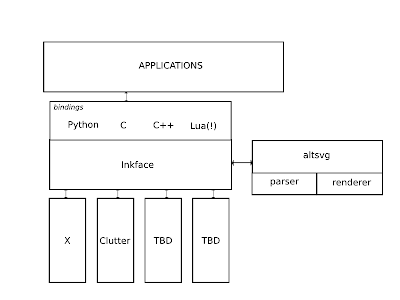
The inkface library provides canvas objects to draw on. These canvas objects can be implemented using different backends. Currently only X is used as backend. Clutter seems possible, it will be there in v0.2.X. Inkface library loads the SVG elements with the help of altsvg library. altsvg library is responsible for parsing the SVG document and rendering its component elements.
I spent past few weeks investigating the SVG rendering solutions that are out there. There are two major efforts in open source to the best of my knowledge: librsvg (Gnome library, which is the base of current libaltsvg) and Qt's couple of libraries (QtSVG and other being a KHTML component).
They are good libraries with their own advantages and pitfalls. But they are made with a simple purpose in mind - Parse the SVG document and render it as an image. They do not handle the individual elements of the SVG DOM tree in a dynamic way. This is the reason, none of them fully supports animation extension of SVG specs.
In the inkface framework, following two things are expected from the altsvg library:
1. Separate rendering of different elements of an SVG document.
2. Programmatic access to the SVG attributes of these individual elements.
I have spent very long time trying to understand librsvg. It was very painful to get it working the way it works right now. I am not satisfied with the patches I applied on top of librsvg to accomplish the 1st requirement above. (2nd requirement is not available in v0.1.X). I have faced great difficulty to understand the highly recursive logic of librsvg. It will take much larger effort to tweak it elegantly so that both the above requirements are fulfilled.
I also looked into Qt SVG libraries. Qt's code is elegant and easy to understand. But I am afraid, it is tightly embedded inside Qt framework (at least it will take long to tear it and take away what's needed, not sure if that's worth it).
After exploring above two options, I have also considered implementing altsvg from scratch. And that sounds like a better option after all. I have started experimenting with that option. Here are some details.
As the altsvg block shows, there are two distinct components in these libraries:
a) SVG parsing - nothing but a standard XML parsing
b) SVG rendering - librsvg uses cairo and QtSVG uses their PaintEngine for this logic.
I plan to reimplement the SVG parsing part. The rendering will be done by cairo or Qt's PaintEngine. Cairo and Qt's rendering library are mature libraries and their role is orthogonal to the above two requirements of the inkface framework.
Furthermore I figure that the SVG parsing part is not as performance critical as rendering part. But it will have to go through lot of iterations of design and implementation. So I will be implementing it in python. Python's excellent support for XML parsing will speed up the prototyping.
So far I see following advantages of implementing altsvg from scratch and that too in python:
1. It will save energy and time in trying to understand existing librsvg/QtSVG libraries and try to redesign them for the purpose that they might not have been designed for in the first place.
2. Some initial work on this front has proved that, I can totally eliminate the need for a designer to change in XML nodes in Inkscape. They will also not need to explicitly mention the order as an attribute of the element. The order in which the elements are shown in the Inkscape will be recognized by the inkface framework. Also the name of the element can be defined using Inkscape's "Object Properties" option in the context menu.
3. Most of the developers who have inquired about this project, have asked about the portability. The choice of python will help address that issue.
4. It certainly would be a daunting task to aim for a full SVG compliance with my own implementation. But in retrospect, I think that's not the goal. It's not necessary initially to implement all of SVG spec. Some basic features like paths (lines, bezier curves, rectangles, ellipses) and gradients should be available soon enough. They are the most widely used elements. Further features like filters can be implemented incrementally. I suspect, that will be a translation of librsvg's cairo calls to PyCairo calls.
5. I am not sure how can I do this, but a progressive rendering of SVG elements seems possible. It will need more interaction between inkface and altsvg. It will improve load time of the GUI.
There are other two topics as well. But I may address them in some later post. Implementation of inkface (its role in the big picture, the clutter backend) and benefits of using OpenGL for rasterization (Qt has a proven advantage over cairo in this regard. I know glitz can solve this problem for cairo, but I didn't find any numbers to support that)

The inkface library provides canvas objects to draw on. These canvas objects can be implemented using different backends. Currently only X is used as backend. Clutter seems possible, it will be there in v0.2.X. Inkface library loads the SVG elements with the help of altsvg library. altsvg library is responsible for parsing the SVG document and rendering its component elements.
I spent past few weeks investigating the SVG rendering solutions that are out there. There are two major efforts in open source to the best of my knowledge: librsvg (Gnome library, which is the base of current libaltsvg) and Qt's couple of libraries (QtSVG and other being a KHTML component).
They are good libraries with their own advantages and pitfalls. But they are made with a simple purpose in mind - Parse the SVG document and render it as an image. They do not handle the individual elements of the SVG DOM tree in a dynamic way. This is the reason, none of them fully supports animation extension of SVG specs.
In the inkface framework, following two things are expected from the altsvg library:
1. Separate rendering of different elements of an SVG document.
2. Programmatic access to the SVG attributes of these individual elements.
I have spent very long time trying to understand librsvg. It was very painful to get it working the way it works right now. I am not satisfied with the patches I applied on top of librsvg to accomplish the 1st requirement above. (2nd requirement is not available in v0.1.X). I have faced great difficulty to understand the highly recursive logic of librsvg. It will take much larger effort to tweak it elegantly so that both the above requirements are fulfilled.
I also looked into Qt SVG libraries. Qt's code is elegant and easy to understand. But I am afraid, it is tightly embedded inside Qt framework (at least it will take long to tear it and take away what's needed, not sure if that's worth it).
After exploring above two options, I have also considered implementing altsvg from scratch. And that sounds like a better option after all. I have started experimenting with that option. Here are some details.
As the altsvg block shows, there are two distinct components in these libraries:
a) SVG parsing - nothing but a standard XML parsing
b) SVG rendering - librsvg uses cairo and QtSVG uses their PaintEngine for this logic.
I plan to reimplement the SVG parsing part. The rendering will be done by cairo or Qt's PaintEngine. Cairo and Qt's rendering library are mature libraries and their role is orthogonal to the above two requirements of the inkface framework.
Furthermore I figure that the SVG parsing part is not as performance critical as rendering part. But it will have to go through lot of iterations of design and implementation. So I will be implementing it in python. Python's excellent support for XML parsing will speed up the prototyping.
So far I see following advantages of implementing altsvg from scratch and that too in python:
1. It will save energy and time in trying to understand existing librsvg/QtSVG libraries and try to redesign them for the purpose that they might not have been designed for in the first place.
2. Some initial work on this front has proved that, I can totally eliminate the need for a designer to change in XML nodes in Inkscape. They will also not need to explicitly mention the order as an attribute of the element. The order in which the elements are shown in the Inkscape will be recognized by the inkface framework. Also the name of the element can be defined using Inkscape's "Object Properties" option in the context menu.
3. Most of the developers who have inquired about this project, have asked about the portability. The choice of python will help address that issue.
4. It certainly would be a daunting task to aim for a full SVG compliance with my own implementation. But in retrospect, I think that's not the goal. It's not necessary initially to implement all of SVG spec. Some basic features like paths (lines, bezier curves, rectangles, ellipses) and gradients should be available soon enough. They are the most widely used elements. Further features like filters can be implemented incrementally. I suspect, that will be a translation of librsvg's cairo calls to PyCairo calls.
5. I am not sure how can I do this, but a progressive rendering of SVG elements seems possible. It will need more interaction between inkface and altsvg. It will improve load time of the GUI.
There are other two topics as well. But I may address them in some later post. Implementation of inkface (its role in the big picture, the clutter backend) and benefits of using OpenGL for rasterization (Qt has a proven advantage over cairo in this regard. I know glitz can solve this problem for cairo, but I didn't find any numbers to support that)
Sunday, January 11, 2009
Inkface + Clutter
Clutter is the easiest way to start coding GUIs with accelerated graphics. I liked it when I first saw the demo in March last year. So all the time while working on inkface, I was waiting for some free time to use inkface with clutter. After getting Inkface v0.1.2 out, I tried my pyclutter... pretty soon figured out a simple way to combine the two.
Check out the following 12 minute video. I put together a simple program in few hours and the video documents all the steps I needed to do. It demonstrates a slider widgets which controls the rotation of a steering wheel.
The program is 169 lines of python code in a single file (including comments and some boilerplate code). It loads the GUI from two svg files (slider, steering). As you can see the slider is unlike any GTK or Qt widget and it was put together in less than 10 minutes in Inkscape (the video is real-time).
[You can skip through the video from 1:00 to 9:40, if you don't want to see all the details of drawing in Inkscape]
Now animated "clutter" GUIs can be designed with smooth curvy shapes and smart color palettes, which are difficult to program, but easy to compose in an image editor. Libraries like clutter are making it possible to design out of rectangular widgets. A library like inkface makes it possible to design those new widgets in an image editor.
Check out the following 12 minute video. I put together a simple program in few hours and the video documents all the steps I needed to do. It demonstrates a slider widgets which controls the rotation of a steering wheel.
The program is 169 lines of python code in a single file (including comments and some boilerplate code). It loads the GUI from two svg files (slider, steering). As you can see the slider is unlike any GTK or Qt widget and it was put together in less than 10 minutes in Inkscape (the video is real-time).


[You can skip through the video from 1:00 to 9:40, if you don't want to see all the details of drawing in Inkscape]
Now animated "clutter" GUIs can be designed with smooth curvy shapes and smart color palettes, which are difficult to program, but easy to compose in an image editor. Libraries like clutter are making it possible to design out of rectangular widgets. A library like inkface makes it possible to design those new widgets in an image editor.
Saturday, January 10, 2009
Inkface v0.1.2, Twitter-inkface client
Finally it is ready. Actually it has been ready for more than couple of weeks now, but I wanted to make sure the bugs in my demo app were not due to problems in core library.
The demo app is a client I wrote for the Twitter service. The intention was to demonstrate how an intuitive GUI can be designed using an Image editor. With the GUI designed using Inkscape and an off-the-shelf python library to talk to Twitter service (Thanks to DeWitt for python-twitter), I only had to write simple glue code to get the whole app working. Check out the video.
Good news is I have setup a debian repo to host packages for this app.
In the Maemo Application Manager, add following Catalog:
Name: Altcanvas
Web Address: http://repo.altcanvas.com
Distribution: testing
Components: main
Refresh the application list. You should see 'twitter-inkface' app in the list. All the dependencies will be automatically pulled from the repo.
Since the repository implementation is currently experimental (No it's not a standard web server! I will save it for a separate post), you may face a problem while installing or I may have to take it offline for modifications. In that case, you can download following four packages and install them with dpkg ("dpkg -i *.deb")
libaltsvg,inkface-python, inklib, twitter-inkface.
For more info on Inkface project, visit the project page.
The demo app is a client I wrote for the Twitter service. The intention was to demonstrate how an intuitive GUI can be designed using an Image editor. With the GUI designed using Inkscape and an off-the-shelf python library to talk to Twitter service (Thanks to DeWitt for python-twitter), I only had to write simple glue code to get the whole app working. Check out the video.
Good news is I have setup a debian repo to host packages for this app.
In the Maemo Application Manager, add following Catalog:
Name: Altcanvas
Web Address: http://repo.altcanvas.com
Distribution: testing
Components: main
Refresh the application list. You should see 'twitter-inkface' app in the list. All the dependencies will be automatically pulled from the repo.
Since the repository implementation is currently experimental (No it's not a standard web server! I will save it for a separate post), you may face a problem while installing or I may have to take it offline for modifications. In that case, you can download following four packages and install them with dpkg ("dpkg -i *.deb")
libaltsvg,inkface-python, inklib, twitter-inkface.
For more info on Inkface project, visit the project page.
Tuesday, December 23, 2008
Inkface update
So as promised, here is an update on Inkface. I am ready with v0.1.2, almost.
A main change in this update is, the definition of a new abstraction called 'Face'. This was introduced to make programming the app more intuitive. A 'Face' object is initialized by giving it a name of SVG file that holds UI elements. One can create several face objects that hold elements from different SVG files, and as per the program logic can add-remove these 'face' objects from the canvas. The elements in the SVG files can be addressed as attributes of the face objects in which they are loaded. This makes the app source code very intuitive. The management of the element objects is done behind the scene without the app programmer having to worry about it.
To demonstrate these features, I have written a simple yet useful app using above concepts. It's a twitter client, written using python-twitter library as backend and inkface-python as front end. This app depicts friends' and public's twits in a more playful manner as clouds and banners, rather than rectangular gtk widgets. It enables text-entry by a face object called 'Keyboard' which implements the logic of text entry (from touch screen interface as well as actual keyboard of n810). I want to polish the app further before making a demo video, so I am not going to rush it today.
The inkface infrastructure is now divided into three libraries: the SVG parser and renderer library - libaltsvg (derivative of librsvg); the python bindings for inkface - inkface-python; a helper python library which defines above mentioned abstractions - inklib. There are deb packages for each of these components. A good news is, I have got permission to upload these packages to maemo extra repo; so users now won't have to worry about dependencies.
Soon I will have to seriously concentrate on the performance issues. As you will observe while running the twitter client, the app takes nearly 50% of n810's total 128M memory. So it surely is not healthy. The python ref count debugging made sure that the memory was no longer leaked in buckets; but a vector graphics based app is known to need more resources. I plan to look deep into librsvg and cairo data structures to trim down the memory usage.
Meanwhile, this update also has some code for OpenGL backend, however it's disabled by default. It is targeted for desktop and OpenGL ES based handhelds.
Tommorrow I am leaving for a vacation, so after I return next week, I will do some final testing and release the deb packages.
That's all for now.
Merry Christmas to all!!!
A main change in this update is, the definition of a new abstraction called 'Face'. This was introduced to make programming the app more intuitive. A 'Face' object is initialized by giving it a name of SVG file that holds UI elements. One can create several face objects that hold elements from different SVG files, and as per the program logic can add-remove these 'face' objects from the canvas. The elements in the SVG files can be addressed as attributes of the face objects in which they are loaded. This makes the app source code very intuitive. The management of the element objects is done behind the scene without the app programmer having to worry about it.
To demonstrate these features, I have written a simple yet useful app using above concepts. It's a twitter client, written using python-twitter library as backend and inkface-python as front end. This app depicts friends' and public's twits in a more playful manner as clouds and banners, rather than rectangular gtk widgets. It enables text-entry by a face object called 'Keyboard' which implements the logic of text entry (from touch screen interface as well as actual keyboard of n810). I want to polish the app further before making a demo video, so I am not going to rush it today.
The inkface infrastructure is now divided into three libraries: the SVG parser and renderer library - libaltsvg (derivative of librsvg); the python bindings for inkface - inkface-python; a helper python library which defines above mentioned abstractions - inklib. There are deb packages for each of these components. A good news is, I have got permission to upload these packages to maemo extra repo; so users now won't have to worry about dependencies.
Soon I will have to seriously concentrate on the performance issues. As you will observe while running the twitter client, the app takes nearly 50% of n810's total 128M memory. So it surely is not healthy. The python ref count debugging made sure that the memory was no longer leaked in buckets; but a vector graphics based app is known to need more resources. I plan to look deep into librsvg and cairo data structures to trim down the memory usage.
Meanwhile, this update also has some code for OpenGL backend, however it's disabled by default. It is targeted for desktop and OpenGL ES based handhelds.
Tommorrow I am leaving for a vacation, so after I return next week, I will do some final testing and release the deb packages.
That's all for now.
Merry Christmas to all!!!
Subscribe to:
Posts (Atom)